
Businesses waste up to one-third of their SaaS budget – often unknowingly. This translates to thousands, even millions, of dollars spent on unused or redundant software subscriptions. From "zombie subscriptions" (tools no longer in use) to overlapping licenses, these costs quickly add up. For example, companies like GitLab saved $4.2M annually by eliminating redundancies, while Adobe cut $60M over four years by auditing their subscriptions.
Here’s how you can take control of your SaaS spending:
- Audit all subscriptions: Review 12 months of financial records, emails, and SSO logs to compile a full list of recurring charges.
- Categorize and prioritize: Group tools by function and focus on high-spend areas like engineering or marketing.
- Spot redundancies: Identify overlapping tools or unused premium features.
- Analyze usage data: Check login patterns and feature-level engagement to find underutilized licenses.
- Automate with tools: Platforms like bizSupply can track renewals, monitor usage, and benchmark pricing to simplify management.
- Optimize costs: Rightsize licenses, cancel underperforming tools, and negotiate better vendor terms.
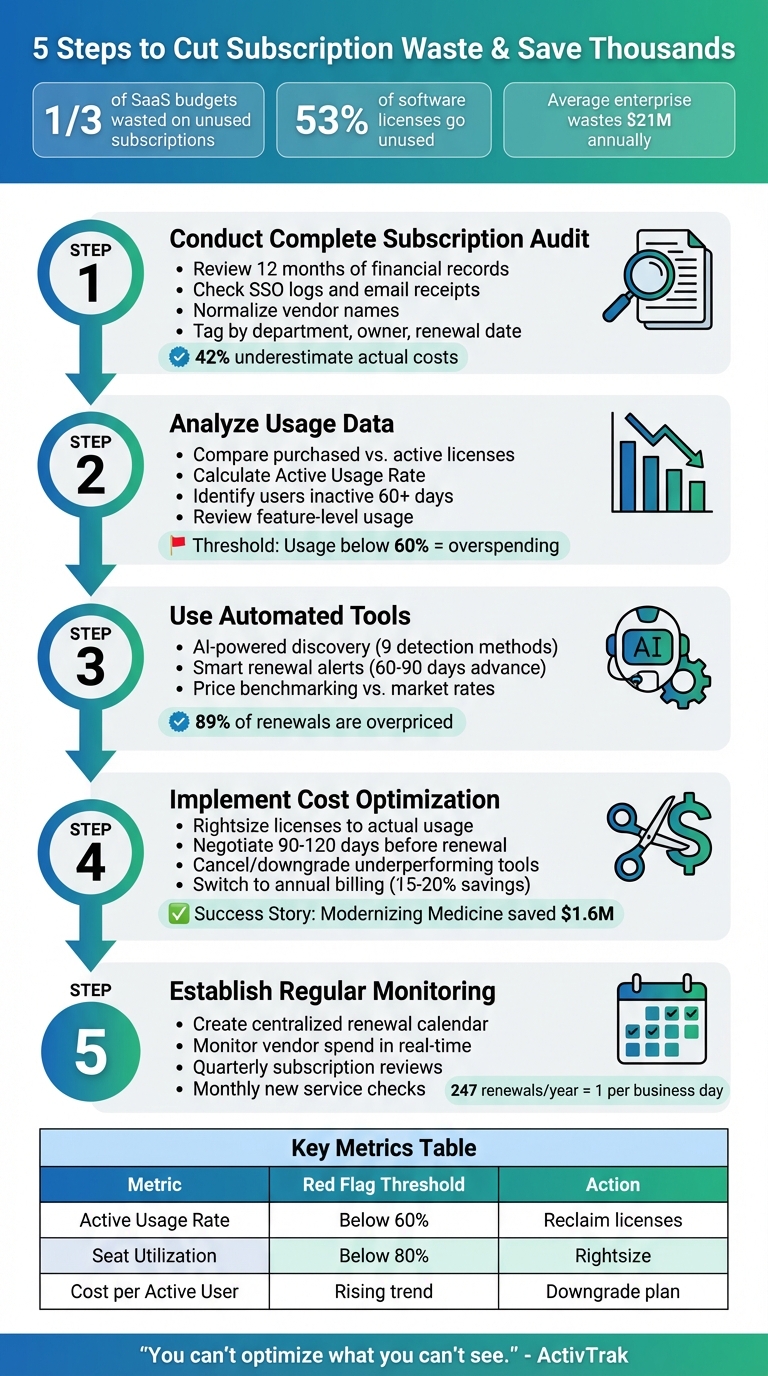
5-Step Process to Identify and Cut Unused Subscription Costs
How to Rationalize Your SaaS Applications to Cut Costs
Step 1: Conduct a Complete Subscription Audit
The first step to managing your subscription costs effectively is understanding exactly what you’re paying for. Many businesses underestimate their subscription spending by as much as 42%, often because these expenses are scattered across unexpected accounts.
Gather a Complete List of Subscriptions
Start by compiling a comprehensive list of all recurring charges. To do this, pull at least 12 months of data from your accounts payable system, corporate credit card statements, and employee reimbursement records. A full year of data ensures you capture annual renewals that might slip through the cracks during monthly reviews. Don’t overlook third-party payment platforms like PayPal, Apple Pay, or Google Pay, where subscriptions often show up under generic names.
Search company emails for keywords like "subscription", "renewal", "welcome", "thank you", and "membership" to uncover receipt confirmations. Check the "Subscriptions" section in the App Stores of company devices for any recurring charges. Additionally, review Single Sign-On logs from platforms such as Okta or Azure AD – these can reveal applications your employees access that might not appear in financial records.
To streamline the process, normalize vendor names using spreadsheet formulas like =UPPER(TRIM(cell)). This helps merge variations such as "Slack, Inc." and "Slack Technologies LLC." For better accountability, tag each subscription with three key details: the responsible department, a specific contract owner, and the next renewal date. This ensures someone is always accountable for each expense.
Categorize Subscriptions by Business Function
Once you have a complete list, group subscriptions into categories based on their business function – such as CRM, project management, video conferencing, marketing automation, or document signing. This categorization can reveal patterns that might otherwise go unnoticed. For instance, you may discover multiple tools serving the same purpose, like team communication or contract management.
Focus your initial review on high-spend departments. For example, Engineering often racks up costs for infrastructure and monitoring, while Revenue Operations tends to drive expenses in sales and marketing automation. Typically, the top 15 suppliers account for about 85% of total software costs, so prioritizing these areas can yield quick results. Work with department heads to identify which tools are "business-critical" versus "nice-to-have", so you can identify subscriptions that could be eliminated without disrupting operations.
Identify Redundant or Overlapping Tools
Next, look for redundancies. Create a comparison matrix to evaluate tools side-by-side based on features, security, and integrations. Keep an eye out for "zombie subscriptions" – charges for projects that ended months ago, licenses assigned to former employees, or free trials that quietly converted to paid plans.
Check if your existing platforms already include features you’re paying for separately. For instance, Microsoft 365 often bundles collaboration and cybersecurity tools, which could overlap with standalone services you’re using.
"Duplicate licenses stay invisible until every contract and receipt lives in one place." – Chris Shuptrine, Content Lead, Torii
To tackle redundancies efficiently, develop a scoring system to prioritize them. Use criteria like matching tax IDs, product SKUs, and overlapping renewal dates to identify the most obvious overlaps. Eliminating these redundancies first can deliver quick wins and build momentum for further cost optimizations.
Once you’ve handled redundancies, you’ll be ready to dive into usage data and identify underutilized subscriptions.
Step 2: Analyze Usage Data to Find Underutilized Subscriptions
Once you’ve completed your subscription audit, the next step is to dig into usage data to identify areas where you’re overspending. Here’s a staggering fact: 53% of software licenses typically go unused in most organizations. For an average enterprise, this translates to about $21 million in avoidable waste. Clearly, there’s plenty of room for optimization.
Review User Activity and License Utilization
Start by comparing the number of purchased licenses to the actual number of users logging in each month. You can gather login data from SSO platforms, vendor dashboards, or HRIS systems to get a clear picture of tool usage. Calculate the Active Usage Rate by dividing the number of active users by the total assigned seats. If this figure is under 60%, you’re likely paying for more than you need.
To take it a step further, categorize users based on their last login:
- 0–7 days
- 8–30 days
- 31–60 days
- Over 60 days
Users who haven’t logged in for more than 60 days are prime candidates for license reclamation. Automate this process by setting up workflows that email users inactive for 30+ days, asking if they still need access. Add a manager approval step to ensure seats are only retained when necessary. This method can also help you identify orphaned accounts – licenses still assigned to employees who have left the company.
It’s not just about tracking logins, though. Dive deeper into feature-level usage. Many companies pay for premium plans, only to find that employees are using basic features that are available in cheaper options. To measure this, calculate the Cost per Active User by dividing the monthly cost of a tool by the number of active users. If this cost is climbing, it’s a sign you’re not getting good value.
Also, consider whether usage aligns with your business cycles. For instance, are certain tools only used during specific times of the year?
Identify Seasonal or Rarely Used Services
Look for patterns in your usage data to spot tools that only serve a purpose during certain periods. For example, tax software might only be used once a year, or an event management platform might be active for a single annual conference. These types of subscriptions often renew automatically, turning into "zombie subscriptions" that drain your budget. On average, companies waste around $135,000 annually on forgotten renewals.
If you notice tools with zero activity for most of the year, consider switching to a pay-as-you-go model or canceling the subscription altogether, resubscribing only when needed. Also, check support ticket logs – if a service generates many unresolved issues, it might not be worth keeping, even if usage data suggests otherwise.
Find Hidden Costs in Unused Features
Another common source of waste? Premium features and add-ons that aren’t being used. Conduct a detailed audit to see which features your team actually relies on versus what you’re paying for. For instance, you might be shelling out for advanced analytics, API access, or priority support that no one in your organization uses. To get a better sense of what’s needed, supplement usage data with surveys to find out if employees are unaware of certain features or if they simply don’t align with their workflows.
"Reducing licensing waste is not just about saving costs. It’s about improving our operational efficiencies, simplifying our technology landscape, and ultimately delivering an amazing employee experience." – Trenton Cycholl, VP of IT and Digital Business, Modernizing Medicine
Keep an eye on these key metrics to uncover hidden inefficiencies:
| Metric | What to Calculate | Red Flag |
|---|---|---|
| Active Usage Rate | Active users ÷ assigned seats | Less than 60% |
| Seat Utilization | Used seats ÷ purchased seats | Below 80% |
| Cost per Active User | Monthly cost ÷ active users | Rising over time |
| Feature Utilization | % using premium features | Low adoption of paid-tier features |
Step 3: Use bizSupply for Automated Waste Detection
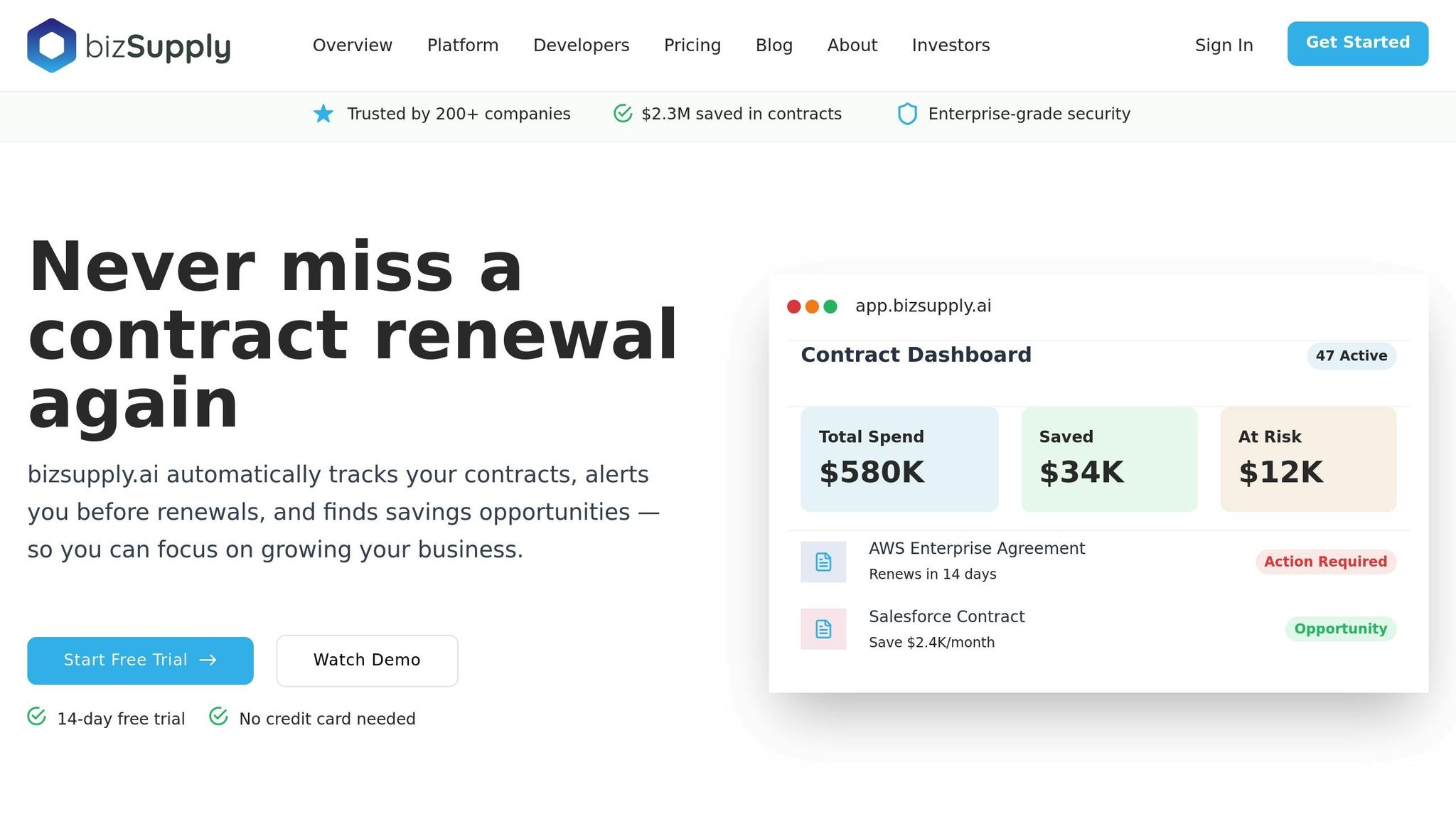
After completing your data-driven audit, it’s time to let automation take the reins. Manual audits can be time-consuming and prone to mistakes. That’s where bizSupply steps in. With its AI-powered discovery tools, bizSupply identifies all your SaaS subscriptions – even those hidden in the cracks. It taps into a variety of sources, like expense reports, vendor invoices, SSO platforms, and license databases, using up to nine different methods to ensure nothing goes unnoticed.
Leverage bizSupply’s Waste Detection Tool
bizSupply’s waste detection tool keeps a constant eye on your subscriptions, comparing what you’ve purchased to how much you’re actually using. It dives into user activity, login patterns, and license usage to highlight inefficiencies. The result? Clear reports that identify inactive, orphaned, or underused licenses – essentially showing you where your money is slipping away. What used to be a tedious manual task is now fully automated, with actionable insights delivered straight to your dashboard.
Stay Ahead with Smart Renewal Alerts
Automatic renewals are a sneaky culprit behind wasted subscription costs. By managing renewals effectively, businesses can cut their SaaS spending by 20% to 30%. bizSupply’s smart renewal alerts keep you in the loop, ensuring you’re never caught off guard by an auto-renewal.
You can customize alerts based on contract value. For high-value subscriptions, set reminders 60–90 days before renewal to allow time for evaluation and negotiation. Smaller contracts might need just a 30-day notice. These alerts are sent to the right people – whether it’s IT admins, finance teams, or department heads – via email, Slack, or Microsoft Teams. And before each renewal, bizSupply automatically pulls usage data so you can confirm whether the service is worth the price.
Optimize Costs with Price Benchmarking
Here’s a startling fact: 89% of enterprise IT purchases and renewals are overpriced. bizSupply’s price benchmarking feature gives you the data you need to challenge those inflated costs. By analyzing what other companies pay for the same software, it provides "best-in-class" pricing targets to use during negotiations. This real-time data helps you negotiate better deals, adjust licenses, and even combat automatic price hikes. On average, companies save 9.2% on total contract value by using this feature.
With benchmarking insights, you can make smarter decisions, like downgrading from premium to standard plans if advanced features aren’t being used. You can also consolidate purchases across departments to unlock bulk discounts.
These tools and insights set the stage for smoother and more efficient cost-saving strategies in the next step.
sbb-itb-291cea0
Step 4: Implement Cost Optimization Processes
Now that you’ve identified areas of waste and collected valuable insights, it’s time to take action. By building on your audit findings and usage data, these cost optimization strategies can deliver measurable savings. For example, the average organization has reduced its SaaS applications from 130 in 2022 to 106 in 2024. This shift reflects a growing trend toward rationalization – making intentional decisions about which subscriptions to keep, adjust, or cancel.
Rightsize Subscriptions to Match Actual Needs
Rightsizing means adjusting software licenses to align with real usage. By syncing license counts with active user data, you can eliminate unnecessary spending. Start by defining what "active" means for your team – this could be based on logins over the past 30 days or regular engagement with key features – and make adjustments accordingly.
In 2023, Modernizing Medicine took this approach, cutting 122 unused applications and saving $1.6 million. They achieved this by carefully monitoring seat utilization and comparing purchased licenses against actual use.
For tools that are essential and likely to be used long-term, consider switching to annual billing. This can often secure discounts of 15–20%, making it a straightforward way to lower costs.
Negotiate Better Terms with Vendors
Leverage your usage data and market benchmarks to negotiate more favorable terms with vendors. Start these conversations 90–120 days before your renewal date to give yourself enough time for thoughtful evaluation and avoid last-minute decisions. Vendors value customer retention, so they’re often willing to offer discounts, flexible terms, or customized plans.
Use your data to strengthen your case. For example, if a large portion of your team isn’t using premium features, negotiate a downgrade to a standard plan. Similarly, if you find lower pricing for similar tools during market research, bring that information to the table. Another effective strategy is consolidating spend across departments – negotiating a single enterprise license instead of multiple smaller subscriptions can unlock additional volume discounts.
A great example of this strategy in action is AbbVie. By using SaaS management insights, they identified financial risks and cut expense-based software spending by 47%, saving millions on unnecessary licenses.
Once you’ve secured better terms, focus on eliminating inefficiencies to maximize the benefits.
Cancel or Downgrade Underperforming Tools
Subscriptions that don’t deliver clear value should be canceled or downgraded. If a tool offers redundant features or has gone unused for a significant period, it’s likely time to reassess. However, before canceling, evaluate any operational risks – complex tools like cloud contact centers may require careful transition planning, while simpler tools can often be discontinued quickly.
Act on cancellations promptly. Many vendors will respond with automated retention offers, such as discounts or free months, when they detect a cancellation request. Be cautious of contractual obligations, though – many agreements include a 60-day notice period for cancellations to avoid being locked into another term.
| Optimization Strategy | What It Does | When to Use It |
|---|---|---|
| Rightsizing | Matches license counts to actual usage | When usage falls below expectations |
| Consolidation | Combines overlapping tools to gain volume discounts | When multiple teams use similar software independently |
| Negotiation | Secures lower prices or more flexible contracts | 90–120 days before renewal |
| Cancellation | Ends subscriptions with low or no ROI | When a tool is redundant or underused |
Step 5: Establish Regular Review and Monitoring Processes
Keeping costs under control isn’t a one-and-done task – it requires constant attention. On average, enterprises juggle around 247 SaaS renewals annually, which translates to nearly one renewal every business day. Without a structured approach, it’s easy to miss deadlines or let unused subscriptions drain your budget. Building on earlier audit and analysis steps, regular monitoring ensures your cost-saving efforts stay on track.
Create a Renewal Calendar
A centralized renewal calendar is your safety net against missed deadlines and unwanted auto-renewals. Gather all your renewal dates, terms, and notice periods in one place, and set reminders for 120, 90, 60, and 30 days before each expiration.
Take Marigold (formerly CM Group) as an example. In 2025, their team, led by Karen Hodson, Global Procurement & Real Estate Officer, saved nearly $1 million in SaaS costs. They did this by reviewing usage and upcoming renewals monthly, focusing specifically on the 30, 60, and 90-day windows. This proactive approach helped them cut waste and streamline their software during a major tech integration.
Many vendors require a 60-day notice period for cancellations. Miss that window, and you could be stuck paying for another term, even if the service is no longer needed. Tools like bizSupply’s automated alerts notify stakeholders about critical renewal dates, ensuring you avoid last-minute scrambles and unnecessary auto-renewals.
Once your renewal dates are organized, shift your focus to real-time spend tracking to catch any overspending as it happens.
Monitor Vendor Spend in Real-Time
Having real-time oversight of your spending helps you catch issues before they snowball into costly mistakes. bizSupply’s dashboard consolidates spend data across departments, giving you a clear view of where your money is going. This is crucial because shadow IT accounts for 45% of a company’s software stack, and most businesses underestimate their actual subscription costs by about 42%.
A quick win? Compare the number of paid licenses to active users. For instance, if you’re paying for 100 seats but only 60 people are actively using the software, you’re throwing money away – cutting those unused seats is an instant cost saver.
"Staying on top of a schedule and knowing what renews when is not an easy thing to do. So the intelligence to me is know what’s coming, know what you’re using, and know what you’re paying is a reasonable price." – Keith Sarbaugh, CIO, Zoetis
Simplify tracking by consolidating payment methods. Using a single corporate card or centralized procurement system makes it easier to spot recurring charges that shouldn’t be there.
Schedule Regular Subscription Reviews
Quarterly reviews of your SaaS stack are essential to keeping subscription creep in check and ensuring your tools align with business goals. Use the audit data and usage insights from earlier steps to guide these reviews. With the average enterprise application portfolio growing more than 30% annually, these check-ins are especially critical for fast-growing companies.
During these reviews, assign each application a score from 1 to 5 based on factors like business impact, migration effort, and how essential it is. This scoring system makes it easier to decide what to keep, downgrade, or cancel. Involve stakeholders from IT, finance, and business units to get a full picture of how each tool is being used.
For added control, consider setting up a monthly review on the first of each month to evaluate any new services added. This habit can help you catch unnecessary subscriptions early, preventing small expenses from snowballing into significant waste.
| Review Type | Frequency | Primary Goal |
|---|---|---|
| Real-Time Monitoring | Continuous | Identify shadow IT and immediate usage spikes |
| Monthly Review | Every 30 Days | Catch new subscription creep and dormant accounts |
| Quarterly Audit | Every 90 Days | High-level stack optimization and redundancy check |
| Renewal Review | 120/90/60/30 Days Pre-Expiry | Negotiate terms, rightsize seats, or cancel |
Conclusion
Managing subscriptions effectively isn’t just about slashing costs – it’s about knowing exactly what you’re using and why. On average, companies waste nearly 30% of their software budget due to poor oversight and unchecked administrative sprawl. That’s a huge opportunity to save, and it starts with taking a structured, informed approach to subscription management.
Following the strategies outlined here can give you a clear picture of your software expenses. By conducting a thorough audit, analyzing usage data, using tools like bizSupply, implementing cost-saving processes, and scheduling regular reviews, you can build a system that keeps waste in check. Together, these steps help organizations recover millions in unnecessary spending.
"You can’t optimize what you can’t see." – ActivTrak
Automated tools make this process even smoother. With bizSupply, features like automated waste detection, smart renewal alerts, and price benchmarking replace the hassle of manual tracking. The platform centralizes your contracts, costs, and renewal dates into one easy-to-use dashboard. This makes identifying issues like shadow IT and duplicate subscriptions much simpler – before they drain your budget.
Start small with a quarterly audit. Even a basic review can uncover surprising savings. For individuals, this might mean saving $100 to $500 per year, while for businesses, the numbers grow exponentially. The key is consistency. Turn subscription management into an ongoing process, because subscription creep doesn’t stop. Regular reviews ensure you’re always in control of your spending.
FAQs
What’s the best way to find and manage unused subscriptions to save money?
To keep tabs on unused subscriptions and manage them effectively, begin by compiling a thorough inventory of all active subscriptions. Include details like vendor names, costs (e.g., $120 per month), start and end dates, and who primarily uses them – whether it’s a specific person or department. Once you’ve got this list, dive into usage data. Check things like login activity or seat utilization to identify subscriptions that see little to no use. Pay special attention to categories like unused licenses, duplicate tools, software for completed projects, or accounts linked to employees who’ve left the company.
After pinpointing these underused or unnecessary subscriptions, take action. Focus on the most expensive or irrelevant ones first – canceling or consolidating where it makes sense. Be sure to document any changes to keep your records accurate and up to date. To avoid repeating the cycle, set up a regular review schedule – quarterly works well – and think about using subscription management tools to simplify the process. These steps can help you trim costs while keeping your subscription lineup lean and well-organized.
How can I negotiate better deals with software vendors to save money?
To secure better deals with software vendors, it’s smart to start early – ideally 90 days before your renewal date. This gives you plenty of time to gather information and prepare. Start by collecting detailed usage data, such as how many licenses are actively being used and which features aren’t getting much attention. This insight can help you highlight the actual value you’re getting and make a stronger case for a discount or a contract adjustment.
Take some time to research what other vendors are offering. Compare their pricing and features to get a sense of the market. This knowledge can be a powerful tool during negotiations, showing that you’re considering other options. Be clear about your goals – whether it’s reducing costs, cutting down on unused licenses, or adding extra perks like training or better support. Use your data and objectives to present a compelling case. If necessary, let the vendor know you’re willing to explore alternatives if they can’t meet your needs.
Once you’ve reached an agreement, make sure to document the updated terms. Set reminders to review your contract regularly so you can avoid unnecessary expenses down the line.
How can automation help businesses manage and reduce SaaS subscription costs?
Automation takes the hassle out of managing SaaS subscriptions by keeping a constant eye on usage, spotting inefficiencies, and addressing them – all without lifting a finger. These systems can track things like license counts, user activity, and spending, then compare that data to contract terms. The result? You get real-time alerts about unused licenses, duplicate purchases, or upcoming renewals.
With automated alerts in place, businesses can tackle problems like overlapping subscriptions or inactive licenses before the next billing cycle hits – potentially saving thousands of dollars. Automation can even go a step further by triggering workflows, such as deactivating unused accounts, and syncing with budgeting tools to show the financial impact. What used to be a tedious, manual process is now a smooth, proactive system that cuts waste and helps you get more out of your SaaS investments.